![3DISC_Logo_RGB_tiny.png]](https://help.3disc.com/hs-fs/hubfs/3DISC_Logo_RGB_tiny.png?height=50&name=3DISC_Logo_RGB_tiny.png)
Case Setup Options
Case Setup options are available in the 3DiscClinic™ Case Setup page.
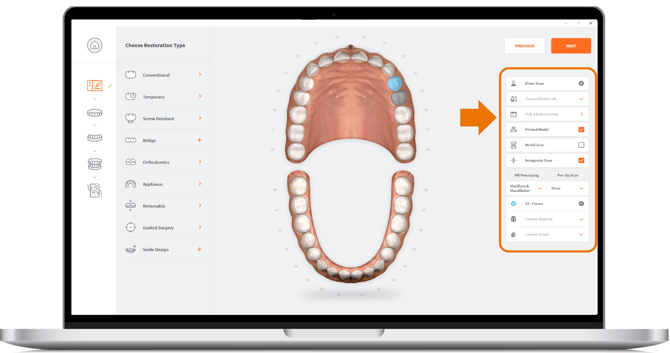
Order Form Options
The following Order Form options are available:
- Patient Name
Patient Name Anonymization
The Patient Name can be anonymized in 3DiscClinic™, and/or anonymized when sent to the Lab
Go to Case Setup in Settings for more information.
- Lab
Configuring Connections to Labs
The Lab to which to send your Order
Lab connections are configured in 3DiscCloud
A preffered lab connection can be configured in 3DiscClinic™ Upload Settings
For more information, visit: Connecting your User Account to 3DiscCloud™
- Date
Request Delivery Date from Lab
The Date you want to receive your Order from the Lab
- Printed Model
Request Printed Model from Lab
Check this option to request a Printed Model from the Lab
- Antagonist Scan
Include Antagonist Scan
Check this option to include the Antagonist Scan in the Scan Workflow
Scan Options
- Model Scan version 3.8
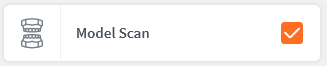
Select Model Scan
Select Model Scan when scanning a 3D model and not a patient. When this scan option is selected, the algorithm is optimised specifically for the scanning of 3D models.
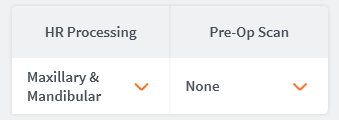
- High Resolution (HR) Processing
Select HR Processing
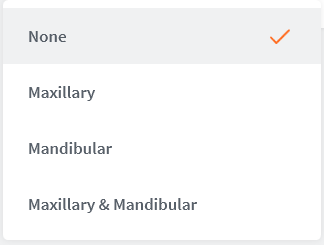
Select High-Resolution processing of scan data for:
- Maxillary
- Mandibular
- Maxillary & Mandibular
- Pre-Op Scan
Include Pre-Operative Scan
Check this option to include a Pre-Op Scan in the Scan Workflow
Adding a Pre-Op Scan to a Pre-existing Scan
Adding a Pre-Op Scan to a Pre-existing Scan
- If you have previously scanned a patient and you want to open and modify the Case Setup, it is possible to add Pre-op steps.
-
If a Pre-op step is added the user will have the option to copy the former scan to the Pre-op step so that they can build upon this.
To do so:
- Return to Case Setup and add a Pre-Op scan
- A pop-up dialog box will ask you if you want to clone the existing scan data for the arch.
- To copy the former scan to the Pre-op step, click Clone

Restoration Options
The following different types of restoration options are available:
| Restoration option | Description |
|---|---|
| Manufacturer | Available Manufacturers |
| System | Available Systems/Models from each Manufacturer |
| Connection Type | Available implant Connection types and sizes for the different Manufacturer Systems & Models |
| Material | Available printed model materials
|
| Shade | Available shade systems and shades |
Editing Restorations Options
The Restorations and Implants libraries - proposing available Restoration & Implant options - can be edited in Case Setup Settings.
To Edit Resorations in 3DiscClinic™ Settings, click:Editing Restorations
To Edit Implant Options in 3DiscClinic™Settings, click:Editing the Implants Library