![3DISC_Logo_RGB_tiny.png]](https://help.3disc.com/hs-fs/hubfs/3DISC_Logo_RGB_tiny.png?height=50&name=3DISC_Logo_RGB_tiny.png)
Displaying Patients
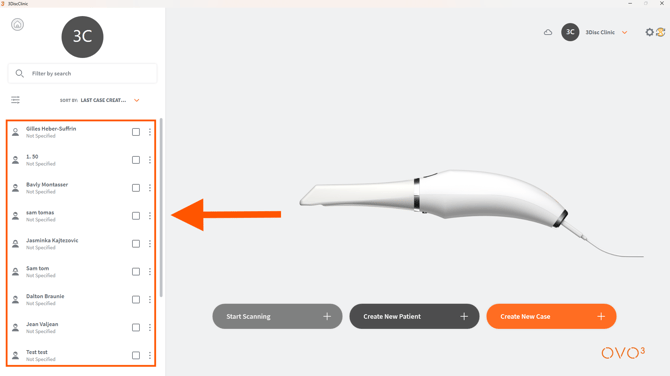
First, select a Preferred Start Page
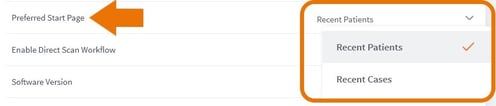
In Settings, you can select a preferred display for your Start Page :
- 1. In Settings/General, click Preferred Start Page.
- 2. Select Recent Patients or Recent Cases .
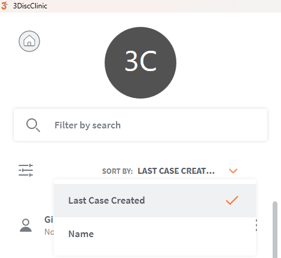
To organize the list of Patients:
Click Last Case Created or Name.
Filtering Patients
You can display a list of Patients by: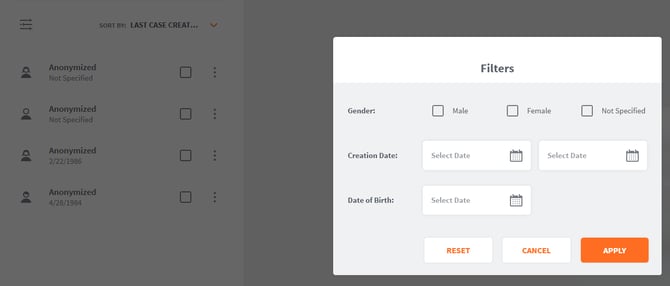
- Gender
- Creation Date (or date range)
- Date of Birth
-
Step 1. Click the Filter icon, and in the Filters dialog box select the desired filter details.
-
Step 2. Click Apply to apply the filter, or Cancel to cancel any modifications made to the filter.
An active filter is indicated by a circle:

To remove an active filter:
- Step 3. Click on the active filter icon.
- Step 4. In the Filters dialog box, click Reset and Apply.