---
title: OVO3 | Displaying Cases in 3DiscClinic™
description: displaying cases
---
[Skip to content](https://help.3disc.com/knowledge/ovo3-displaying-cases-in-3discclinic#main-content)
English
Show submenu for translations
![3DISC\_Logo\_RGB\_tiny.png\]](https://help.3disc.com/hs-fs/hubfs/3DISC_Logo_RGB_tiny.png?height=50&name=3DISC_Logo_RGB_tiny.png)
- [Default HubSpot Blog](https://3disc-1.hubspotpagebuilder.com/blog)
Open main navigation
Close main navigation
- [Default HubSpot Blog](https://3disc-1.hubspotpagebuilder.com/blog)
- English
Show submenu for translations
- Go to 3disc.com
Go to 3disc.com
Welcome to OnlineHelp!
- There are no suggestions because the search field is empty.
1. [OnlineHelp](https://help.3disc.com/knowledge?hsLang=en)
2. [OVO3 | Patients & Cases](https://help.3disc.com/knowledge/ovo3-patients-cases?hsLang=en)
# OVO3 | Displaying Cases in 3DiscClinic™
### **Displaying Cases in 3DiscClinic™**
To Select a **Patient** and display associated cases:
- Tick a patient checkbox.
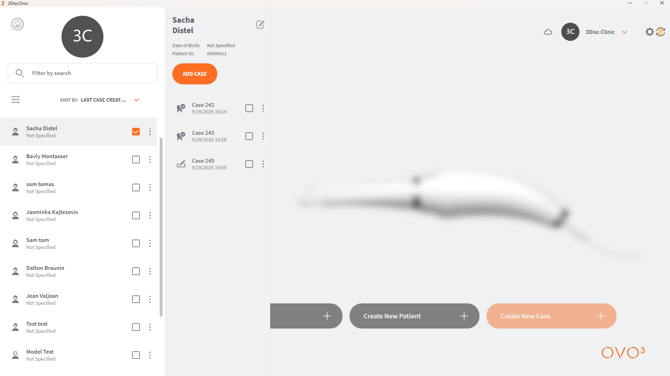
The list of cases for the selected patient is displayed as shown.
For ease-of-use, the *most recent case* is now automatically displayed in **Case Preview** for the selected patient.
### Previewing a Patient Case
To **Preview** or **Review** a **Patient Case**, in the list of **Patient Cases**:
- Tick a **Case** checkbox:
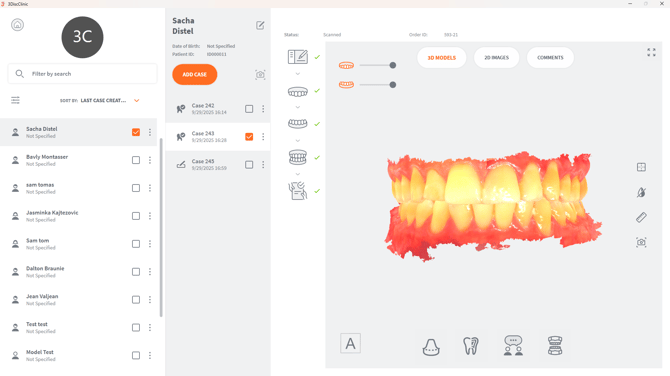
A **Preview** of the selected **Case** is displayed as shown.
- [Computer Requirements](https://help.3disc.com/knowledge/computer-requirements?hsLang=en)
- [OVO3 | Getting started](https://help.3disc.com/knowledge/ovo3-getting-started?hsLang=en)
- [OVO3 | Patients & Cases](https://help.3disc.com/knowledge/ovo3-patients-cases?hsLang=en)
- [OVO3 | Scanning](https://help.3disc.com/knowledge/ovo3-scanning?hsLang=en)
- [OVO3 | All Tools](https://help.3disc.com/knowledge/ovo3-all-tools?hsLang=en#main-content)
- [Scan Tools](https://help.3disc.com/knowledge/ovo3-all-tools?hsLang=en#scan-tools)
- [Live Scan Tools](https://help.3disc.com/knowledge/ovo3-all-tools?hsLang=en#live-scan-tools)
- [Bite Aligment Tools](https://help.3disc.com/knowledge/ovo3-all-tools?hsLang=en#bite-aligment-tools)
- [Case Review Tools](https://help.3disc.com/knowledge/ovo3-all-tools?hsLang=en#case-review-tools)
- [OVO3 | 3DiscCloud](https://help.3disc.com/knowledge/ovo3-3disccloud?hsLang=en)
- [OVO3 | 3DiscClinic Settings](https://help.3disc.com/knowledge/ovo3-3discclinic-settings?hsLang=en#main-content)
- [Case/Database Import - Export](https://help.3disc.com/knowledge/ovo3-3discclinic-settings?hsLang=en#case-database-import-export)
- [OVO3 | Support](https://help.3disc.com/knowledge/ovo3-support?hsLang=en)
- [Default HubSpot Blog](https://3disc-1.hubspotpagebuilder.com/blog)
[](http://3DISC.com)
[mailto:email@email.com](mailto:email@email.com)
Copyright © 2026, 3DISC