![3DISC_Logo_RGB_tiny.png]](https://help.3disc.com/hs-fs/hubfs/3DISC_Logo_RGB_tiny.png?height=50&name=3DISC_Logo_RGB_tiny.png)
Managing Patients
The 3DiscClinic Home Page presents the list of Patients and Cases.
-
Select a Patient to view the list of Cases associated with this patient profile.
- The most recent case is automatically displayed in Case Preview.
-
Select a case to display the Case Preview.
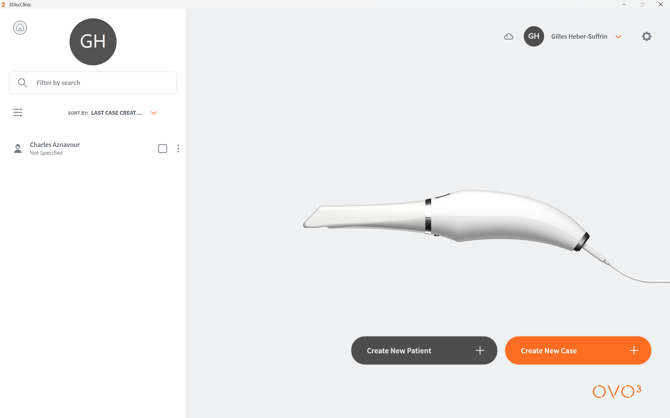
3DiscClinic™ Home Page: OVO3™ IOS
Creating a Patient Profile
To create a patient profile in 3DiscClinic™ :
- Step 1. Click on the CREATE NEW PATIENT click-bar in the User Home Page (see image above).
- Step 2. In the Create New Patient dialog box, enter the patient details.
- Step 3. Click Create.
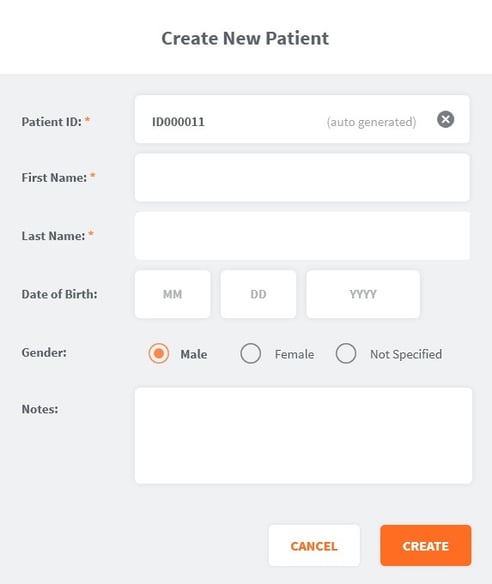
It's as simple as that!